Free Desktop Software — Windows

Extract clean domains from any bulk list in seconds

Free Domain Extractor Online Tool

SmartEmailExtractor is a powerful domain extractor online tool built for marketers, sales teams, and lead generation professionals. Simply paste your bulk URL list, extract clean domains instantly, and export organized data to CSV or Excel — no technical skills needed. Stop wasting hours on manual domain research and start building high-quality lead lists faster with our free desktop software.

🆓100% Free Download
Fast Bulk Extraction
🔒Runs 100% Locally
📊CSV & Excel Export
🌐Any Public Domain
🚫No Cloud Upload
Informational Guide

What is a Domain Extractor Online?

A domain extractor online is a tool that automatically pulls clean, structured domain data from large URL lists — without opening each website manually. Instead of spending hours copy-pasting website addresses, you simply upload your bulk list and the tool processes every domain in seconds, returning organized business data ready for outreach or CRM import.

SmartEmailExtractor's domain extractor online goes further than basic extraction. It crawls each domain and surfaces emails, phone numbers, WhatsApp contacts, and social media profile links — all in one clean export file. Sales teams, recruiters, and digital marketers use it daily to build accurate prospect lists faster and reduce manual research time by up to 90%.

Process thousands of domains in one batch using our domain extractor online tool — no manual copy-pasting, no browser tab switching, no wasted research time.
Every extraction is a live crawl with zero cache — no recycled databases, no outdated records, just fresh and accurate contact data pulled directly from each domain in real time.
All data is processed locally on your computer — never uploaded to external servers, never shared with third parties, never exposed to cloud security risks. Your prospect lists stay 100% private.
Install and run on unlimited Windows machines simultaneously at full speed — one free license covers your entire team with no extra cost, no seat limits, no slowdown.
How It Works

How to Use Domain Extractor Online in 3 Simple Steps

Our domain extractor online tool is built for speed — download once, paste your domain list, and export clean lead data in minutes. No learning curve, no wasted time.

01
Download & Install

Download SmartEmailExtractor free desktop app on your Windows PC. Installation takes under 2 minutes — no technical setup, no coding, no subscription required.

02
Add Your Domain List

Paste or upload your bulk domain list directly into the domain extractor online tool. Add hundreds or thousands of domains in one go — the tool handles any list size instantly.

03
Extract & Export Results

Hit extract and let SmartEmailExtractor crawl every domain automatically. Download your clean, duplicate-free results as CSV or Excel — ready for CRM import or outreach campaigns.

Data Coverage

What Data Does Our Domain Extractor Online Pull?

Every domain you extract is scanned for 10+ contact and social data points — giving your sales and marketing team everything they need to reach the right people without switching between multiple tools or platforms.

Emails
Phone
WhatsApp
Skype
Facebook
Instagram
Twitter
LinkedIn
YouTube
Pinterest
Audience Targeting

Who Can Use This Domain Extractor Online Tool?

Our domain extractor online is designed for any professional who needs accurate contact data from public domains — fast. Whether you are running outbound sales, managing marketing campaigns, or building lead lists for clients, this tool removes manual research entirely and delivers organized results you can act on immediately.

  • Sales Teams & SDRs
  • Email Marketers
  • Digital Agencies
  • Founders & Startups
  • Recruiters & HR Teams
  • Growth Marketers
  • Freelancers
  • Business Consultants
Trust & Brand

Why Choose SmartEmailExtractor Software?

SmartEmailExtractor is trusted by thousands of sales and marketing professionals as their go-to domain extractor online solution. Unlike browser-based tools that slow down or hit rate limits, our desktop-first approach gives you full processing power, unlimited domain inputs, and clean exports — completely free with no hidden charges or usage caps.

  • No hidden charges
  • Unlimited domain extraction
  • CSV and Excel export ready
  • Fast, lightweight software
  • Auto duplicate removal
  • Secure local data processing
  • Bulk domain list support
  • Regular software updates
Lead Generation Workflow

20 Reasons to Use a Domain Extractor Online for Lead Generation

From cold email to social outreach — here is exactly how teams use our domain extractor online tool to turn raw domain lists into qualified leads and real business opportunities every day.

  1. 01Build targeted prospect lists from any niche or industry domain in minutes using our domain extractor online tool.
  2. 02Eliminate hours of manual research by automating domain-to-contact data extraction in one batch process.
  3. 03Extract verified business emails from domains and launch cold email campaigns with higher delivery rates.
  4. 04Pull direct phone numbers from domains and reach decision-makers faster through cold calling outreach.
  5. 05Collect WhatsApp numbers from business domains and connect with prospects on their preferred platform.
  6. 06Extract LinkedIn profiles from domains and send personalized connection requests to warm up cold leads.
  7. 07Gather Instagram and Facebook handles from domains to run targeted social media outreach campaigns.
  8. 08Build clean CRM-ready contact lists by exporting domain extraction results directly to CSV or Excel.
  9. 09Remove duplicate contacts automatically so your outreach list stays clean and your sender score stays healthy.
  10. 10Identify the right decision-maker contacts per domain instead of guessing generic info@ or contact@ emails.
  11. 11Scale your lead generation from 10 domains to 10,000 domains without any extra manual effort or cost.
  12. 12Improve reply rates by reaching prospects across email, phone, and social — all extracted from one domain list.
  13. 13Support agency workflows by processing multiple client domain lists separately and exporting clean reports.
  14. 14Help recruiters find direct contact details from company domains to reach candidates and hiring managers faster.
  15. 15Give growth teams a repeatable, scalable data pipeline that feeds outreach tools without third-party data costs.
  16. 16Enable freelancers to build niche prospect lists for clients quickly using bulk domain extraction in one session.
  17. 17Reduce cost-per-lead significantly by replacing expensive data vendors with free direct domain extraction.
  18. 18Track down social media profiles from domains to build multi-touch outreach sequences across platforms.
  19. 19Let founders and startups identify and contact potential customers directly without hiring a research team.
  20. 20Create a consistent daily lead generation workflow — extract domains, enrich contacts, and outreach at scale.
Simple workflow: use our domain extractor online to pull contact data once, organize your list by segment, then run multi-channel outreach — email, phone, and social — to generate consistent, scalable leads every week.
Compare Software

Domain Extractor Online vs Other Software — Full Comparison

Not all domain extractors work the same way. See exactly why SmartEmailExtractor outperforms browser-based and subscription tools when it comes to speed, data coverage, and export quality for real lead generation workflows.

Other Software

  • Bulk Domain ProcessingLimited to small batches or requires expensive paid upgrades to handle large domain lists at scale.
  • Data AccuracyPulls outdated or recycled contact data from third-party databases that may be months old.
  • Export QualityBasic CSV only — messy column formatting that needs manual cleanup before CRM import.
  • Data CoverageEmails only — misses phone numbers, WhatsApp contacts, and social media profile links entirely.
  • Workflow SpeedSlow browser-based processing that stalls, crashes, or times out on large domain lists.
  • Cost and FeesMonthly subscriptions, per-lead charges, or strict free tier limits that block bulk extraction.
  • Extracted Data Stays on Your IPAll extracted data passes through and is stored on third-party cloud servers you do not control.
  • Runs Entirely on Your Local ComputerBrowser-based domain extractor tools rely on shared cloud servers that throttle speed, queue your jobs, and slow down during peak hours — completely outside your control.
  • Data Safety & PrivacyYour prospect lists and extracted contact data are uploaded to and processed on external servers.
  • Fresh Extraction — No Cache or Old DataReturns cached or pre-scraped results that may be weeks or months out of date.
  • Use on Unlimited Systems SimultaneouslyLicense locked to one device or requires separate paid seats for each team member.
  • No Internet Dependency for ProcessingCompletely stops working if your internet connection drops mid-extraction, losing all progress.
  • Local Storage & Data OwnershipYour data sits on vendor servers — if they shut down or change terms, you lose access immediately.
  • No Login Required to ExtractForces account login before every session and may revoke access if subscription lapses.
  • Consistent Performance at ScaleShared cloud servers throttle speed when many users are active — your extraction slows without warning.

SmartEmailExtractor — Domain Extractor Online

  • Bulk Domain ProcessingProcess unlimited domains in one batch — no caps, no tier upgrades, no waiting or queue delays.
  • Data AccuracyCrawls live domain pages directly in real time so every email and contact pulled is fresh and current.
  • Export QualityClean CSV and Excel exports with auto duplicate removal — organized and CRM-ready instantly.
  • Data CoverageExtracts emails, phones, WhatsApp, and 8+ social profiles from every domain in one single run.
  • Workflow SpeedFull desktop-level processing speed — extracts thousands of domains faster than any online tool.
  • Cost and Fees100% free forever — no subscription, no credit card, no per-domain or per-export fees ever.
  • Extracted Data Stays on Your IPEvery domain is extracted and stored directly on your own IP and machine — no third-party servers involved.
  • Runs Entirely on Your Local ComputerSmartEmailExtractor runs 100% on your local Windows computer — no shared servers, no queue delays, no speed throttling. Full processing power, full control, every single time.
  • Data Safety & PrivacyAll data is processed locally on your computer — never uploaded, never shared, never exposed to external systems.
  • Fresh Extraction — No Cache or Old DataEvery extraction is a live crawl — no cached results, no recycled data, always the freshest contacts available.
  • Use on Unlimited Systems SimultaneouslyInstall and run on unlimited Windows computers at the same time — same full speed on every machine, no extra cost.
  • No Internet Dependency for ProcessingCore processing runs locally so a brief connection drop does not interrupt or lose your extraction run.
  • Local Storage & Data OwnershipAll extracted data is saved directly to your local drive — you own it completely with zero vendor dependency.
  • No Login Required to ExtractRegister once and extract anytime — no repeated login walls, no session expiry blocking your workflow.
  • Consistent Performance at ScaleYour local hardware powers every extraction — performance stays consistent whether you run 10 or 10,000 domains.
Product Walkthrough

See How Our Domain Extractor Online Works — Step by Step

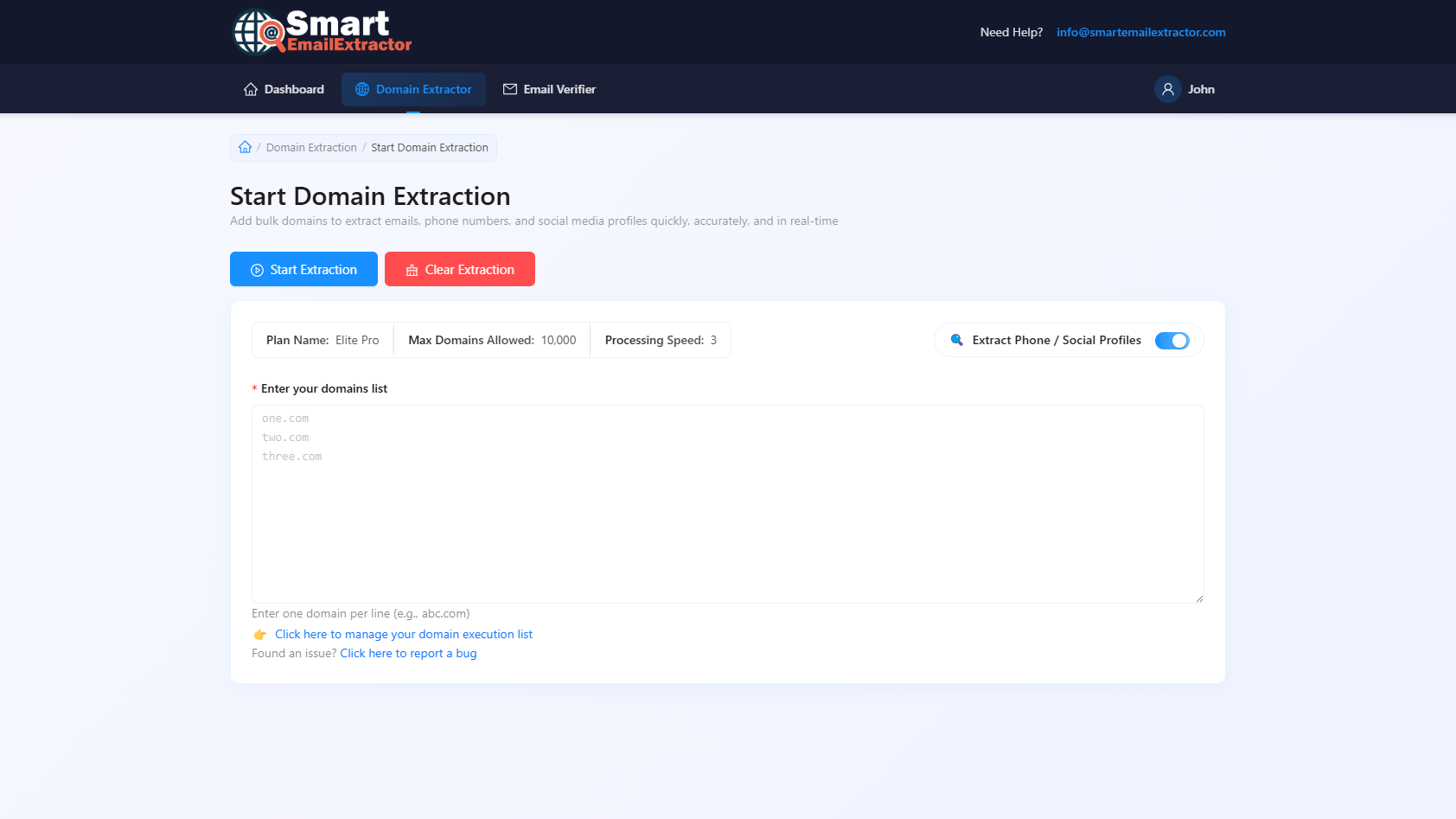
Watch how SmartEmailExtractor moves from raw domain input to clean, export-ready contact data. Every screen below shows a real step inside our domain extractor online desktop workflow — from domain list upload to final CSV download.

Domain extractor online — 1 — Add Domains walkthrough screenshot

The biggest advantage of our domain extractor online desktop tool is direct CSV and Excel export with zero manual cleanup — your team gets CRM-ready lead data immediately after every extraction run.

Pricing

Free Domain Extractor Online — No Credit Card Needed

Start extracting domains completely free with no time limit or usage cap. Need advanced features for your team or agency? View our business plans built for high-volume extraction at scale.

Free Domain Extractor

No credit card — start in 2 minutes

Download free, add your domain list, and extract emails, phones, and social profiles instantly — no limits, no expiry date.

Start Free — Download Now

Premium for Business Teams

Built for agencies and high-volume extraction

Need priority support, advanced crawling depth, or multi-user access? View premium business plans built for scale.

View Business Pricing
What Is a Domain Extractor?

How a Domain Extractor Online Workflow Improves Your List Building

A domain extractor online tool is built to solve one of the biggest bottlenecks in outbound sales and marketing — manually finding contact data for hundreds of target companies. Instead of opening each website one by one and copying details by hand, you upload your full domain list and let the tool do all the heavy lifting. Every domain gets scanned automatically, and you receive a single organized output with emails, phone numbers, and social profiles ready to use.

For teams running outbound campaigns, agency prospecting, SEO link outreach, or partner discovery, using a domain extractor online tool at scale saves hours of research every single week. It also standardizes your lead data format before CRM import — reducing errors and improving campaign consistency across your entire outreach operation.

SmartEmailExtractor is designed specifically for this workflow. You get bulk domain input support, three extraction depth levels — Basic, Normal, and Deep — and clean CSV or Excel exports with automatic duplicate removal. There is no browser slowdown, no usage cap, and no subscription required. The entire process runs locally on your Windows desktop, giving you faster speeds and full control over your data privacy.

The desktop approach is especially powerful for high-volume work. Unlike browser-based tools that stall on large lists, SmartEmailExtractor processes thousands of domains in one uninterrupted run. Your team gets a repeatable, scalable pipeline — from raw domain list to CRM-ready contact database — without relying on expensive third-party data vendors or monthly subscription tools.

FAQ

Frequently Asked Questions About Domain Extractor Online Tools

What is a domain extractor online tool?

A domain extractor online tool is software that automatically scans a list of website domains and pulls structured contact data — including emails, phone numbers, WhatsApp contacts, and social media profiles — from each domain's public pages. SmartEmailExtractor does this in bulk, so you can process hundreds or thousands of domains in one run without any manual research.

How do I extract domains from a list of URLs?

Simply download SmartEmailExtractor, paste or upload your bulk domain list into the tool, select your extraction depth (Basic, Normal, or Deep), and click Start Extract. The tool crawls every domain automatically and returns clean, organized contact data ready to export as CSV or Excel within minutes.

Is this domain extractor online tool free to use?

Yes — SmartEmailExtractor is 100% free to download and use with no credit card required, no subscription fee, and no extraction limits. You get unlimited domain processing, full data export, and all core features completely free forever.

Can I extract domains in bulk using this tool?

Absolutely. SmartEmailExtractor is built specifically for bulk domain extraction. You can upload lists of hundreds or thousands of domains at once and the desktop tool processes all of them automatically — far faster than any browser-based or online-only tool.

What is the difference between domain extraction and email extraction?

Domain extraction pulls and processes a list of website domains from URLs or text inputs, while email extraction collects email addresses from those domains. SmartEmailExtractor combines both — it takes your domain list and automatically extracts emails, phone numbers, and social profiles from every domain in one single workflow.

Do I need to install software to extract domains?

Yes — SmartEmailExtractor is a Windows desktop application that you download and install once. The desktop approach gives you faster processing speed, local data privacy, and stable bulk extraction performance that browser-based online tools cannot match for large domain lists.

Can I use this tool for SEO link building and outreach?

Yes. Many SEO professionals use our domain extractor online tool to collect contact details from target websites for link building campaigns. Simply upload your prospecting domain list, extract contact emails and social profiles, then reach out directly — without paying for expensive outreach databases.

What format does the extracted domain data export in?

SmartEmailExtractor exports all extracted data in clean CSV and Excel formats with automatic duplicate removal. Each export includes emails, phone numbers, WhatsApp contacts, and social media profile links organized by domain — ready for direct CRM import or outreach campaign setup.

Testimonials

What Users Say About Our Domain Extractor Online Tool

Real feedback from sales teams, marketers, recruiters, and agencies using SmartEmailExtractor as their primary domain extractor online solution for lead generation.

"SmartEmailExtractor cut our prospecting time in half. We upload our domain list every Monday and have a clean lead sheet ready before lunch. Best free domain extractor online tool we have used."

Rahul Mehta

Head of Sales, B2B SaaS Company

"We tried three different tools before finding this one. The bulk domain extraction is fast, the exports are clean, and it has never crashed on a large list. Exactly what our agency needed."

Sophie Williams

Lead Generation Manager, Digital Agency

"As a freelancer handling outreach for multiple clients, this domain extractor online tool saves me hours every week. I can run separate lists for each client and export clean CSVs in minutes."

Carlos Mendes

Freelance Outreach Specialist

Ready to Scale Your Domain Extractor Online Workflow?

Download SmartEmailExtractor free, upload your domain list, and start pulling emails, phone numbers, and social profiles in minutes. No subscription, no credit card, no extraction limits — just fast, accurate bulk domain extraction that your entire team can use every day.